
Tunable White Control Unit DALI (230V AC, flush-mounting) with integrated power supply unit
TWS U1 DALI
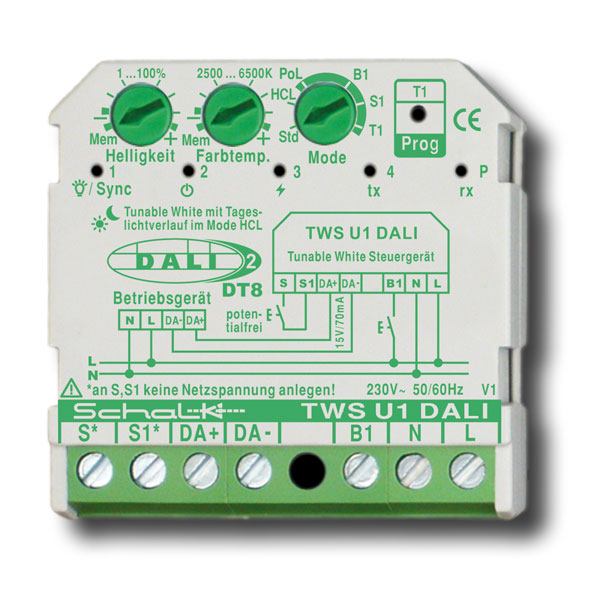
Easy-to-install DALI-2 DT8 certified control unit with integrated DALI bus power supply, for brightness and colour temperature control of DALI Tunable White luminaires via broadcast commands. Features an integrated, switchable HCL (Human Centric Lighting) control for automatic colour temperature adjustment using a stored daylight curve. Suitable for lamps with dimmable DT8 DALI ballast.
Special Features
- DALI-2-certified control unit for controlling brightness and color temperature
- Dims compatible DALI control gear
- No DALI programming device required
- Integrated DALI power supply (max. 70 mA) for up to 35 DALI control gear units; passive operation also possible
- Option to connect up to 3 TWS 1 / TWS U1 in parallel to increase the number of DALI participants (active operation)
- For broadcast operation (central telegram)
- Behavior after power restoration is adjustable
- Integrated HCL (Human Centric Lighting) function can be enabled
- Function can be assigned separately for each input and for the Prog button (see data sheet for programming)
- Can be used independently of the switch program
General Information
The TWS U1 enables convenient and simple control of brightness and color temperature when used with compatible DALI light sources. Because different switching and control functions can be assigned to the inputs, the control unit can be used universally in a wide variety of application scenarios. For example, it can be used for simple single-room solutions, as well as in combination with motion detectors or in more complex installations. Parallel operation of up to 3 units is also possible to increase the number of DALI control units. A DALI programming device is not required, as all settings can be made directly on the unit.
The integrated HCL control (optional) ensures automatic adjustment of the color temperature throughout the day—even in smaller lighting systems without complicated configuration—to positively support users’ well-being and productivity.
Thanks to its compact dimensions, the TWS U1 DALI can be mounted directly into installation boxes behind a pushbutton from any switch series.
How It Works
The rotary potentiometers are used to adjust brightness, color temperature, and mode. The mode options are Standard (Std), HCL, and Programming.
Standard Mode (Std)
Brightness control (dimming) and on/off switching via a pushbutton input (B1 by default) and color temperature adjustment via another pushbutton input (S1 by default). If no serial pushbutton is available, operation with a single pushbutton can also be implemented. The assignment can be changed as desired (see Programming). A short press on input B1 (230 V AC) turns the lighting on or off; a long press increases or decreases the brightness. The dimming direction changes automatically with each long press. A short press on input S1 (3V AC) switches between predefined color temperature values; a long press makes the color temperature warmer or cooler. The direction changes automatically with each long press.
Caution: To connect the TWS U1 correctly, no mains voltage must be present at S1/S. For this purpose, a 2-pole series switch can be used, for example.
HCL Mode (HCL)
In HCL mode, when the lighting is on, the color temperature automatically follows a predefined daylight curve. The HCL control system does not affect the brightness, which can be manually adjusted to meet specific needs using connected push buttons. The control unit contains a predefined daylight curve that is suitable for most applications.
If the color temperature is changed manually (e.g., via a pushbutton), the automatic HCL control temporarily pauses until the lighting is turned off and then back on. For more information on time synchronization and other topics, please refer to the data sheet.
Programming Mode (green-highlighted area on the third potentiometer)
An individual function can be assigned to each input (TWS U1: B1, S1) and the Prog button/T1 by turning the potentiometer to the desired input and selecting the desired function by pressing the Prog button/T1 (repeatedly).
In addition, the behavior after power restoration can be set via PoL (Power-on Level) and by pressing the Prog button/T1 (multiple times) (see the “Programming” section of the datasheet). Programming must be confirmed by pressing and holding the Prog button for 3 seconds. Afterward, simply turn the potentiometer back to “Std” or “HCL,” and the function is ready for use.
Also available as a panel-mount version (REB) TWS1D9.
Additional information
Technical data
| Type: | TWS U1 DALI |
| Item no.: | TWSU1D9 |
| EAN: | 4046929201186 |
| Specifications: | 230V AC, DALI-2 multi-master, integrated power supply unit |
| Dimensions: | 43 x 43 x 18.5mm |